
Due: Before Class on Monday (submit on Moodle)
Overview
This assignment builds directly on the in-class activity. You will now:
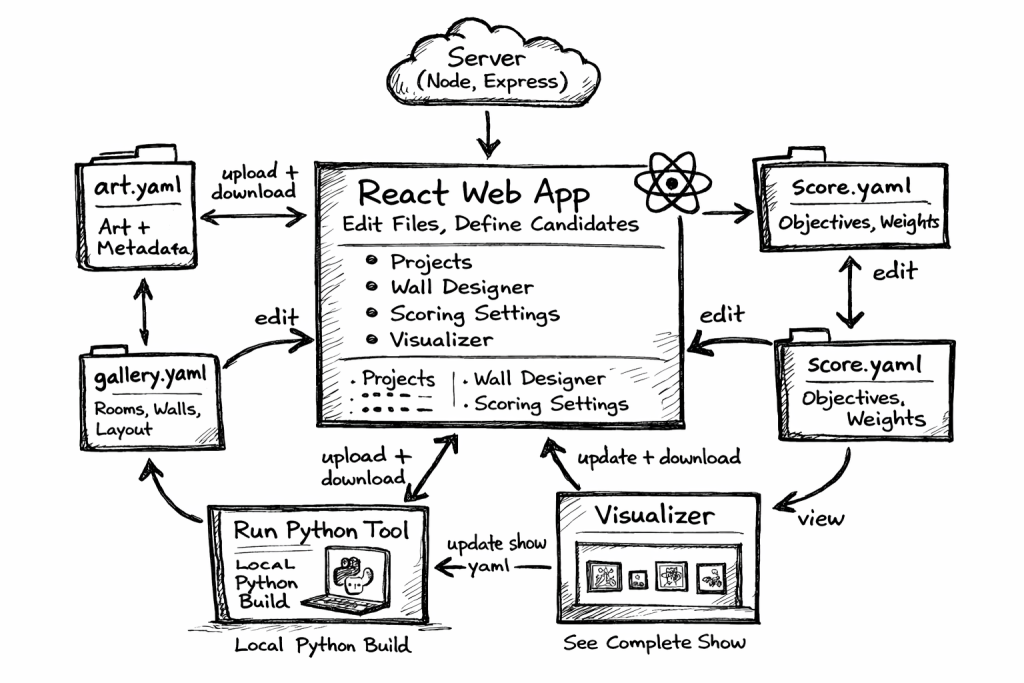
- Use the Gund Gallery Show Builder and Python tool to design walls.
- Analyze the current wall-design algorithm in the Python starter code.
The goal is to move from simply using the system to understanding and evaluating it.
Part 1: Wall Design Using the Platform
Objective
Design three different walls using the full workflow:
- selecting candidate artworks,
- adjusting scoring,
- running the Python wall designer,
- visualizing results,
- and iterating until you are satisfied.
Requirements
For each of three walls:
- Select a wall in the web interface.
- Choose a set of candidate artworks.
- Run the Python wall designer using your project files.
- Upload the resulting show file and visualize the wall.
- Adjust the scoring file and repeat.
You must try multiple scoring variations for each wall.
What You Should Do
For each wall:
- Try at least 2–3 different scoring configurations.
- Observe how scoring changes affect the result.
- Decide which result is the best for that wall.
“Best” is not defined for you — you must justify your decision.
Deliverable for Part 1
You should be prepared to demonstrate your work in class.
Be ready to show:
- the wall you selected,
- the candidate artworks you used,
- at least two different scoring configurations,
- the resulting visualizations,
- and your final chosen design.
You should also be able to explain:
- what changed between runs,
- how scoring influenced the result,
- and why you chose your final version.
Part 2: Algorithm Review and Writeup
Objective
Examine the Python wall-designer-starter code and explain:
- how the current algorithm works,
- how the interface between the YAML files and the algorithm is structured.
What to Focus On
You are not expected to understand every line of code. Instead, focus on the structure.
A. How the Algorithm Works
Explain, in your own words:
- What inputs does the algorithm use?
- (art file, gallery file, show file, scoring file)
- What is it trying to do?
- What steps does it take to build a wall?
- How does it decide which artworks to place?
- How does it evaluate whether a wall is “good”?
You may describe this at a high level — think in terms of process, not syntax.
B. The Interface Between Files and Code
Explain how the system connects:
- YAML files (data)
- Python code (algorithm)
In particular:
- How are the YAML files loaded?
- What structures do they become in Python?
- What parts of the show file does the algorithm read?
- What parts of the show file does it modify or produce?
The goal is to understand the contract between:
“what the web app produces” and “what the algorithm expects”
Deliverable for Part 2
Submit a written document (PDF or text) on Moodle.
Your writeup should include:
Section 1: Algorithm Explanation
A clear explanation of how the wall-design algorithm works.
Section 2: File Interface Explanation
A clear explanation of how the YAML files interact with the Python program.
Section 3: Observations (Short)
Briefly describe anything you noticed, such as:
- limitations of the current algorithm,
- behaviors that surprised you,
- things that might be improved.
Submission Instructions
Submit your writeup on Moodle before class on Monday.
There is no file upload for your walls — you will demonstrate those in class.
What You Should Learn
By completing this assignment, you should:
- understand the full workflow from web interface to algorithm,
- see how scoring affects generated results,
- understand how structured data drives algorithm behavior,
- and be prepared to begin modifying the algorithm next week.
Important Notes
- This is an exploration and analysis assignment, not a “correct answer” assignment.
- You are expected to experiment and iterate.
- You should be able to explain your decisions clearly.
Next week, we will begin modifying the algorithm itself.