
Overview
This document presents a complete relational data model for the School Activities App. The system allows students to browse and join activities, enables leaders and faculty to manage them, and provides administrators with approval and oversight capabilities.
The design is realistic for a React / Node / MariaDB web application while remaining appropriate for a student software development project.
Core Assumptions
- Students create accounts and log in
- Students browse and join activities
- Leaders or faculty manage activities
- Administrators approve or reject activities
- Users receive notifications about updates
Main Entities
- Users
- Organizations
- Organization Members
- Activities
- Activity Memberships
- Events
- Event RSVPs
- Approvals
- Notifications
Relationships Summary
- A user may belong to many organizations
- An organization may have many users
- An organization may create many activities
- An activity belongs to one organization
- An activity may have many events
- A user may join many activities
- An activity may have many users
- A user may RSVP to many events
- An event may have many RSVPs
- Activities and organizations go through approval workflows
Complete Table Design
1. Users
Purpose: Stores all users including students, leaders, faculty, and administrators.
Columns:
- id (PK) – INT, auto increment
- first_name – VARCHAR(50), not null
- last_name – VARCHAR(50), not null
- email – VARCHAR(100), not null, unique
- password_hash – VARCHAR(255), not null
- role – ENUM(student, leader, faculty, admin)
- class_year – INT
- major – VARCHAR(100)
- is_active – BOOLEAN
- created_at – DATETIME
- updated_at – DATETIME
2. Organizations
Purpose: Stores clubs, teams, and school groups.
Columns:
- id (PK) – INT
- name – VARCHAR(100), unique
- description – TEXT
- category – VARCHAR(50)
- email_contact – VARCHAR(100)
- advisor_user_id – FK → Users
- created_by_user_id – FK → Users
- status – ENUM(pending, approved, inactive)
- created_at – DATETIME
- updated_at – DATETIME
3. Organization Members
Purpose: Many-to-many relationship between users and organizations.
Columns:
- id (PK)
- organization_id – FK → Organizations
- user_id – FK → Users
- membership_role – ENUM(member, leader, advisor)
- joined_at – DATETIME
- status – ENUM(active, inactive, pending)
Constraint:
- Unique (organization_id, user_id)
4. Activities
Purpose: Core table representing activities students can join.
Columns:
- id (PK)
- organization_id – FK → Organizations
- title – VARCHAR(150)
- description – TEXT
- activity_type – ENUM(club, meeting, volunteer, sports, arts, academic, social, other)
- location – VARCHAR(150)
- start_date – DATE
- end_date – DATE
- meeting_pattern – VARCHAR(100)
- capacity – INT
- visibility – ENUM(public, members_only, private)
- status – ENUM(draft, pending, approved, rejected, archived)
- created_by_user_id – FK → Users
- approved_by_user_id – FK → Users
- approved_at – DATETIME
- created_at – DATETIME
- updated_at – DATETIME
5. Activity Memberships
Purpose: Tracks which users are part of which activities.
Columns:
- id (PK)
- activity_id – FK → Activities
- user_id – FK → Users
- membership_status – ENUM(requested, approved, waitlisted, rejected, left)
- joined_at – DATETIME
- notes – TEXT
Constraint:
- Unique (activity_id, user_id)
6. Events
Purpose: Specific scheduled instances within an activity.
Columns:
- id (PK)
- activity_id – FK → Activities
- title – VARCHAR(150)
- description – TEXT
- event_date – DATE
- start_time – TIME
- end_time – TIME
- location – VARCHAR(150)
- max_attendees – INT
- created_by_user_id – FK → Users
- status – ENUM(scheduled, cancelled, completed)
- created_at – DATETIME
- updated_at – DATETIME
7. Event RSVPs
Purpose: Tracks attendance responses for events.
Columns:
- id (PK)
- event_id – FK → Events
- user_id – FK → Users
- rsvp_status – ENUM(yes, no, maybe)
- responded_at – DATETIME
Constraint:
- Unique (event_id, user_id)
8. Approvals
Purpose: Tracks approval workflows.
Columns:
- id (PK)
- entity_type – ENUM(organization, activity)
- entity_id – INT
- submitted_by_user_id – FK → Users
- reviewed_by_user_id – FK → Users
- decision – ENUM(pending, approved, rejected)
- comments – TEXT
- submitted_at – DATETIME
- reviewed_at – DATETIME
9. Notifications
Purpose: Stores system notifications for users.
Columns:
- id (PK)
- user_id – FK → Users
- title – VARCHAR(150)
- message – TEXT
- notification_type – ENUM(approval, reminder, membership, system)
- is_read – BOOLEAN
- created_at – DATETIME
Recommended Relationships
- Users ↔ Organizations (many-to-many via Organization Members)
- Organizations → Activities (one-to-many)
- Users ↔ Activities (many-to-many via Activity Memberships)
- Activities → Events (one-to-many)
- Users ↔ Events (many-to-many via Event RSVPs)
- Users → Notifications (one-to-many)
Minimum Viable Product (MVP)
Start with:
- Users
- Organizations
- Activities
- Activity Memberships
- Approvals
Add later:
- Events
- Event RSVPs
- Notifications
- Organization Members
Conclusion
This data model provides a clean, scalable relational structure for the School Activities App. It supports user roles, activity management, event scheduling, participation tracking, and approval workflows while remaining extensible for future features.
ER Diagram (Simple Text Version)
Entities
Users
- id (PK)
- first_name
- last_name
- role
Organizations
- id (PK)
- name
- advisor_user_id (FK → Users)
- created_by_user_id (FK → Users)
Activities
- id (PK)
- organization_id (FK → Organizations)
- created_by_user_id (FK → Users)
Events
- id (PK)
- activity_id (FK → Activities)
Relationships
Users → Organizations
- A user can create many organizations
- A user can advise organizations
Users ↔ Organizations
- Many-to-many through Organization Members
Organizations → Activities
- One organization can have many activities
Users → Activities
- A user can create activities
- A user can approve activities
Users ↔ Activities
- Many-to-many through Activity Memberships
Activities → Events
- One activity can have many events
Users ↔ Events
- Many-to-many through Event RSVPs
Users → Approvals
- Users submit and review approvals
Users → Notifications
- A user can receive many notifications
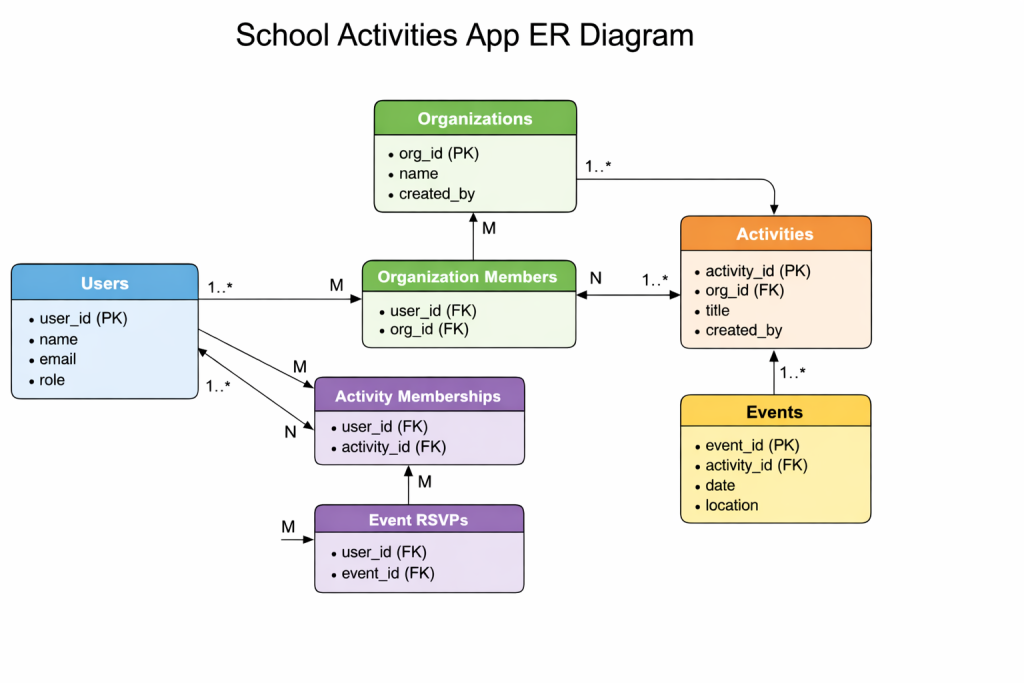
Short Narrative
The system is centered around users, organizations, and activities. Organizations create activities, and users participate through memberships. Activities may have events, and users RSVP to those events. Administrators manage approval workflows, and notifications keep users informed of system updates.