
Goal
To examine and set up an SQL based C++, Python, or Node based Web phone directory using MySQL.
You will use from the following projects:
- https://github.com/jimskon/PhoneBookComplete (C++)
- https://github.com/jimskon/PhoneBookPython (Python)
- https://github.com/jimskon/PhoneNodeREST (JavaScript with node.js)
The projects can be tried here:
- https://cslab.kenyon.edu/class/softdev/skon/PhoneAppComplete/phoneApp.html (C++)
- https://cslab.kenyon.edu/class/softdev/skon/PhoneAppPython/phoneApp.html (Python)
- http://cslab.kenyon.edu:9020/ (JavaScript with node.js)
Method
Step 1 – Get the demo software running from your account and with your Database:
- Download your choice of the github projects (links above)
This should be done with the followings:
Mac open a terminal or Windows open Powershell
type: “ssh username@cslab.kenyon”
Enter your student ID as the password
NOTE: You need to download the project to you home directory, NOT your web directory!
2. Use git to get the PhoneBookComplete, PhoneBookPython, or PhoneNodeRest projects.
After you use GIT to download the project, you will need to :
- Create your own version of the database.
- Change the names (skon) in the software
- in Makefile change user to your username
- Do this is 4 places
- in the Javascript (phoneApp.js) change cgi program name to use your username:
$.ajax({ url: '/cgi-bin/skon_phoneAppComplete.cgi?deleteid='+$(this).attr('ID')+'&operation=delete',
or (in the Python version)
$.ajax({ url: '/cgi-bin/skon_phoneApp.cgi?deleteid='+$(this).attr('ID')+'&operation=delete',
- In PhoneBook.h or phoneApp.py to change USER and DB to your username and PASS to your student ID
#define USER "test"
#define DB "testpassword"
#define PASS "password"
Add a PhoneBookComplete or PhoneBookPython directory to your web directory
mkdir /var/www/html/class/ssd/username/PhoneAppComplete
or (for Python)
mkdir /var/www/html/class/ssd/username/PhoneAppPython
For python, edit phoneApp.py and change the following line to point to your phoneBook.py:
sys.path.insert(1, '/home/students/yourusername/PhoneBookPython/')
- Type “make” to build and deploy your application
- Add the Routines to the Database (see next step)
- Go to the app in a browser (with your username):
https://cslab.kenyon.edu/class/ssd/username/PhoneAppComplete/
Add some records to the data base.
Below is the structure of the database table you will need. You need to create a table named “Phonebook” with the same fields and types, in you database:
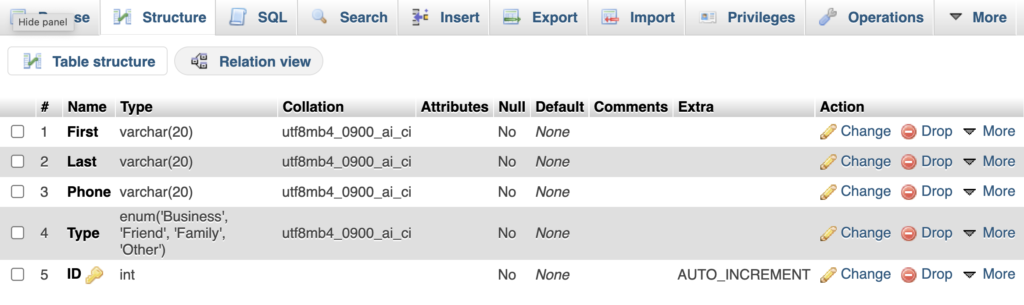
Note the “AUTO_INCREMENT” for the ID field. This field is used as the unique ID for every row, and can be used for unambiguously refering to a record when changing or deleting. The “AUTO_INCREMENT” attribute assigns unique inter values for each record in a sequence. To do this click the “A_I” box for the field (you must scroll to the right to see it). This check box is avalable both then creating the table, and when editing the structure.
- Step 3 – Get the system to work with your database.
Node.js version
For this version use git to clonethe project. Then read the instructions in the README.md file.
Turn in a link to you running application.