
Introduction
Relational databases are a fundamental aspect of computer science and software development. They allow us to efficiently store, retrieve, and manipulate structured data. In this tutorial, we will cover the essential theory of relational databases and guide you through the design process using Entity-Relationship (E-R) diagrams. We’ll also include Mermaid source code for creating E-R diagrams.
Topics Covered:
- What is a Relational Database?
- Key Concepts in Relational Databases
- Steps in Designing a Relational Database
- Entity-Relationship Diagrams
- Normalization Principles
- Example Project: Designing a Student Course Management System
- Examples of Relational Database Relationships
1. What is a Relational Database?
A relational database is a type of database that stores data in structured tables, which are related to each other through keys. Each table consists of rows (records) and columns (attributes).
Advantages of Relational Databases:
- Data integrity
- Flexibility and scalability
- Ease of querying using SQL (Structured Query Language)
2. Key Concepts in Relational Databases
Primary Keys:
- A unique identifier for each record in a table.
Foreign Keys:
- A field in one table that references the primary key in another table, establishing a relationship.
Relationships:
- One-to-One (1:1): A single record in one table is related to a single record in another.
- One-to-Many (1:N): A single record in one table is related to multiple records in another.
- Many-to-Many (M:N): Multiple records in one table are related to multiple records in another, often resolved using a junction table.
3. Steps in Designing a Relational Database
Step 1: Identify the Entities
Determine the main objects that need to be represented in your database (e.g., Students, Courses, Professors).
Step 2: Define the Attributes
Identify the properties of each entity (e.g., Student Name, Course Code).
Step 3: Determine Relationships
Establish how the entities are related (e.g., Students enroll in Courses).
Step 4: Create an E-R Diagram
Draw an Entity-Relationship diagram to visualize the entities, attributes, and relationships.
Step 5: Normalize the Database
Apply normalization techniques to eliminate redundancy and ensure data integrity.
4. Entity-Relationship Diagrams
E-R diagrams are graphical representations of entities, their attributes, and their relationships. Below is an example of an E-R diagram for a Student Course Management System.
E-R Diagram
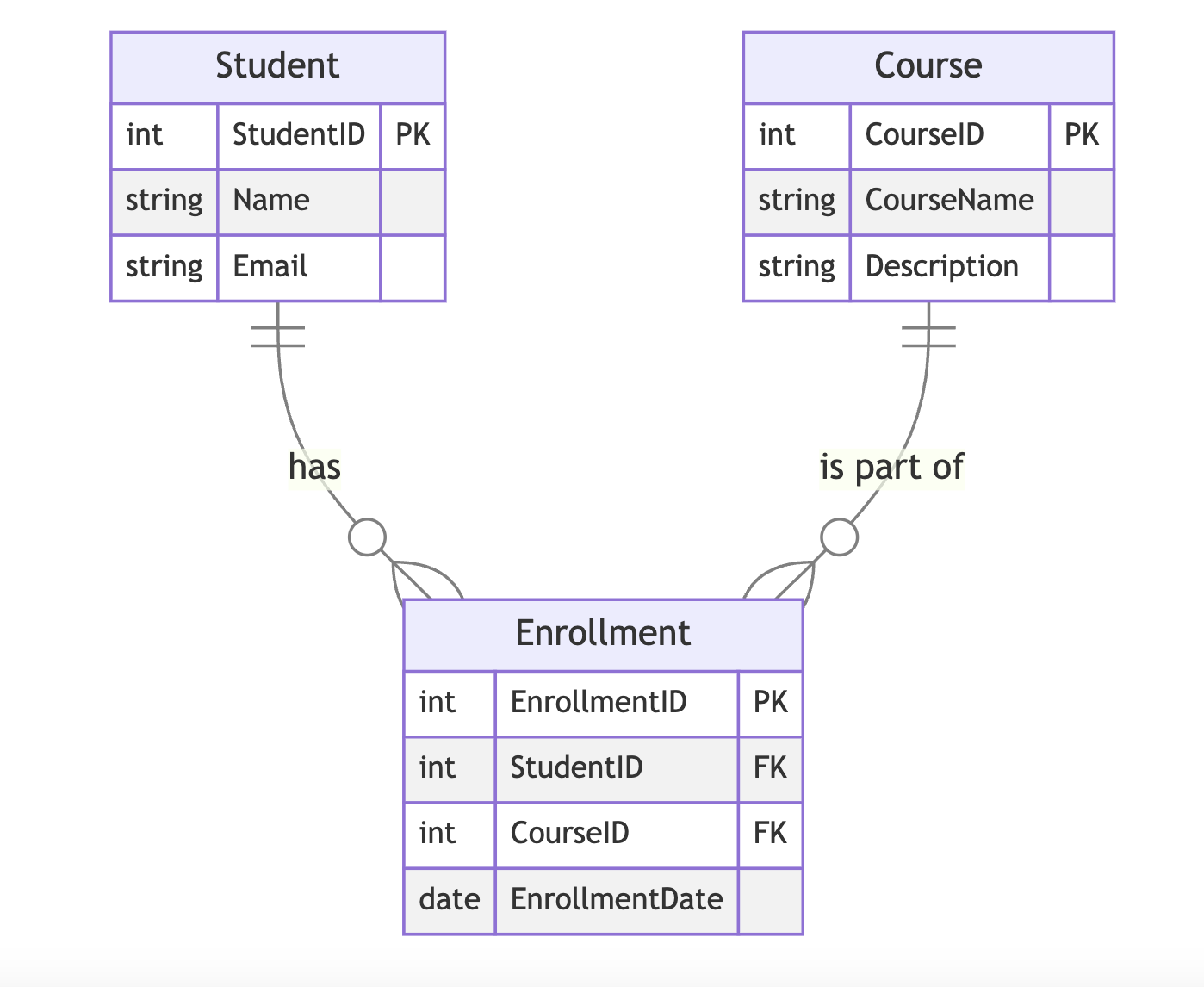
(Mermaid Source Code):
erDiagram
    Student {
        int StudentID PK
        string Name
        string Email
    }

    Course {
        int CourseID PK
        string CourseName
        string Description
    }

    Enrollment {
        int EnrollmentID PK
        int StudentID FK
        int CourseID FK
        date EnrollmentDate
    }

    Student ||--o{ Enrollment : "has"
    Course ||--o{ Enrollment : "is part of"
Explanation:
- Entities: Student, Course, Enrollment
- Relationships:
- A Student “has” one or more Enrollments.
- A Course “is part of” one or more Enrollments.
- Primary Keys (PK): Unique identifiers for each entity.
- Foreign Keys (FK): Keys that reference another table to establish relationships.
5. Normalization Principles
Normalization ensures that the database is efficient and free from redundancy. The key normalization forms are:
First Normal Form (1NF):
- Each column contains atomic (indivisible) values.
Second Normal Form (2NF):
- The table is in 1NF, and all non-key attributes are fully dependent on the primary key.
Third Normal Form (3NF):
- The table is in 2NF, and all attributes are only dependent on the primary key (no transitive dependency).
6. Example Project: Designing a Student Course Management System
Problem Statement:
Design a database to manage students, courses, and enrollments in a university.
Steps:
- Identify Entities:
- Student, Course, Enrollment
- Define Attributes:
- Student: StudentID, Name, Email
- Course: CourseID, CourseName, Description
- Enrollment: EnrollmentID, StudentID, CourseID, EnrollmentDate
- Establish Relationships:
- Students enroll in Courses.
- Draw E-R Diagram:
- Use the Mermaid code provided above to visualize the design.
- Normalize:
- Ensure the database design follows 3NF.
7. Examples of Relational Database Relationships
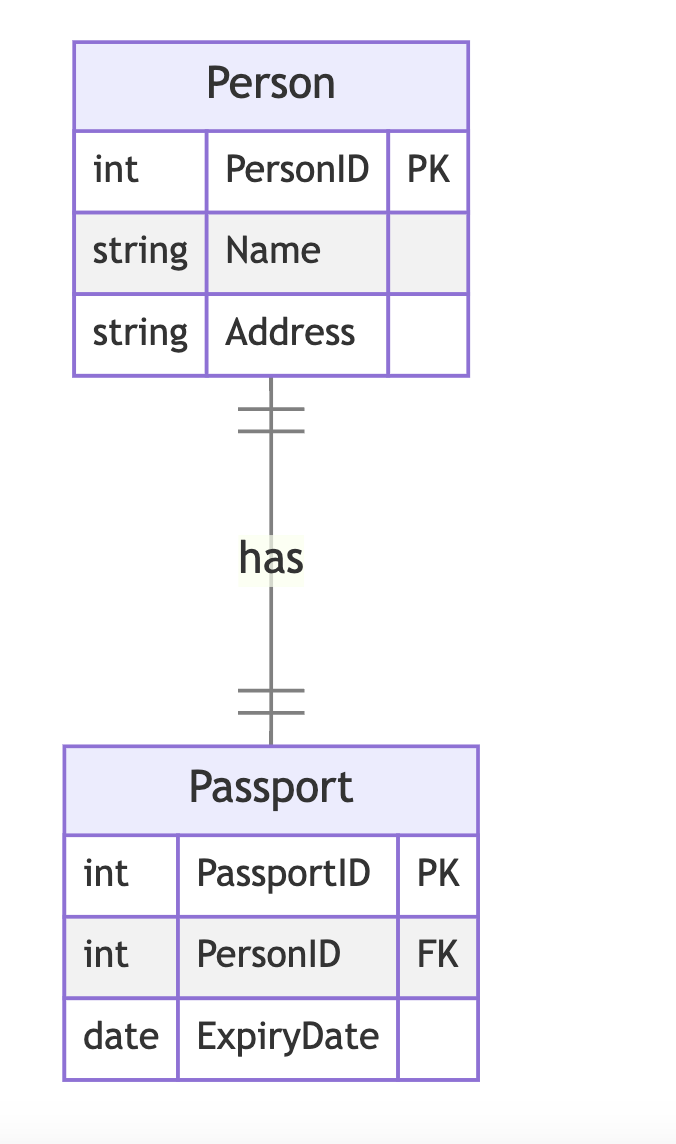
7.1 One-to-One (1:1) Relationship
Example: A Person entity and a Passport entity. Each person has one passport, and each passport belongs to one person.
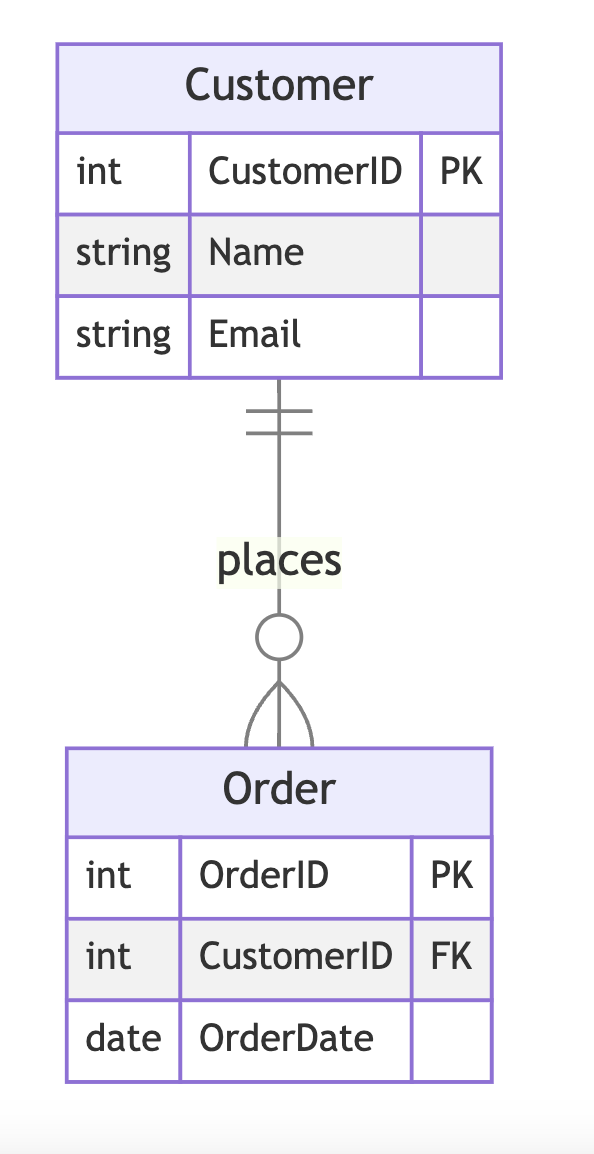
7.2 One-to-Many (1:N) Relationship
Example: A Customer entity and an Order entity. A customer can place multiple orders, but each order is placed by one customer.
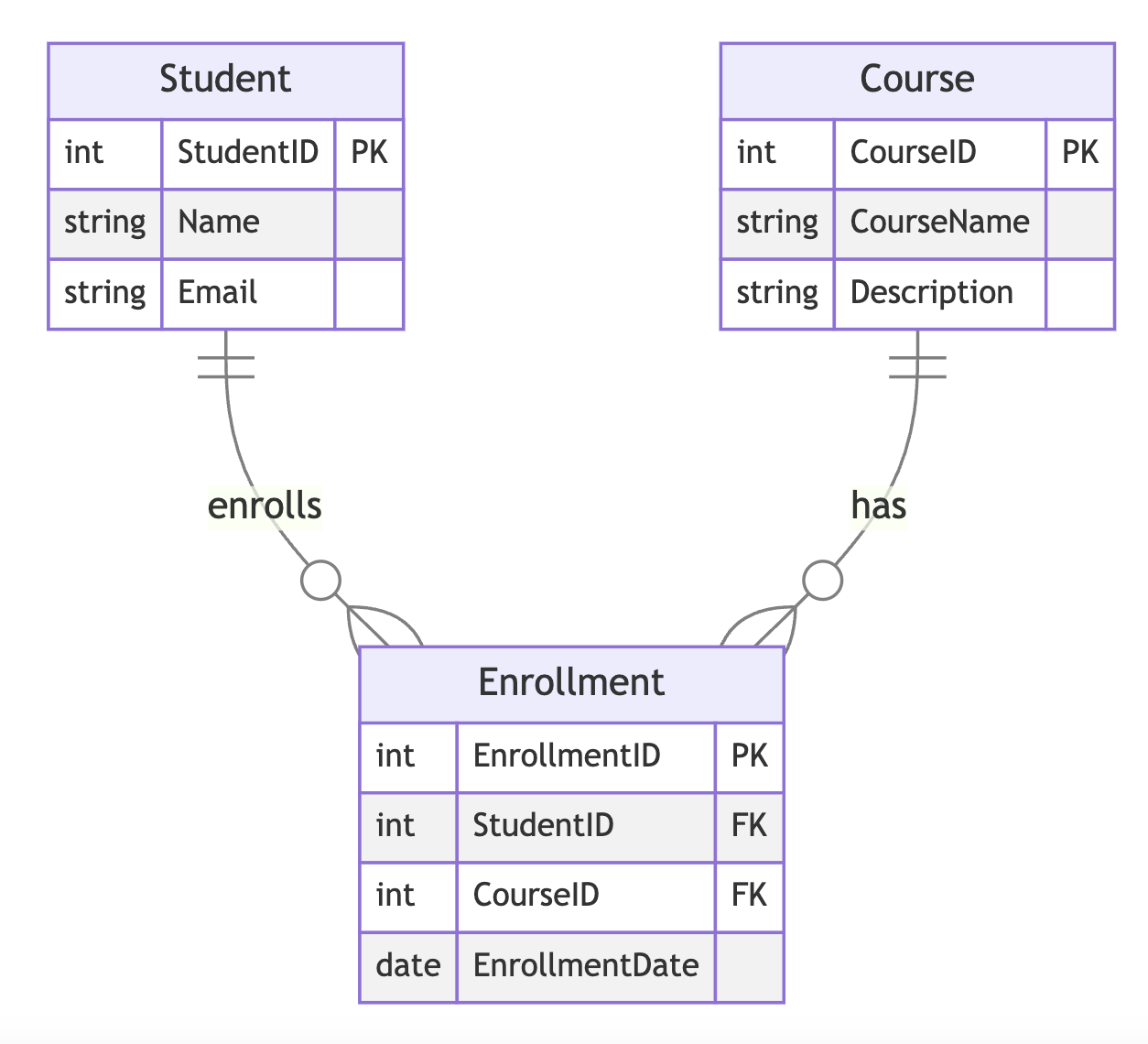
7.3 Many-to-Many (M:N) Relationship
Example: A Student entity and a Course entity. Students can enroll in multiple courses, and courses can have multiple students.
Conclusion
Understanding relational database theory and design is crucial for building efficient and scalable systems. By following the steps outlined in this tutorial, you can create well-structured databases and avoid common pitfalls like redundancy and poor data integrity.
Use tools like Mermaid for E-R diagrams and practice applying normalization principles to strengthen your database design skills.
8. Normalizing an Unnormalized Database
In this activity, we will start with an unnormalized database consisting of five tables and progressively normalize them into Third Normal Form (3NF). Each step will be illustrated using Mermaid diagrams.
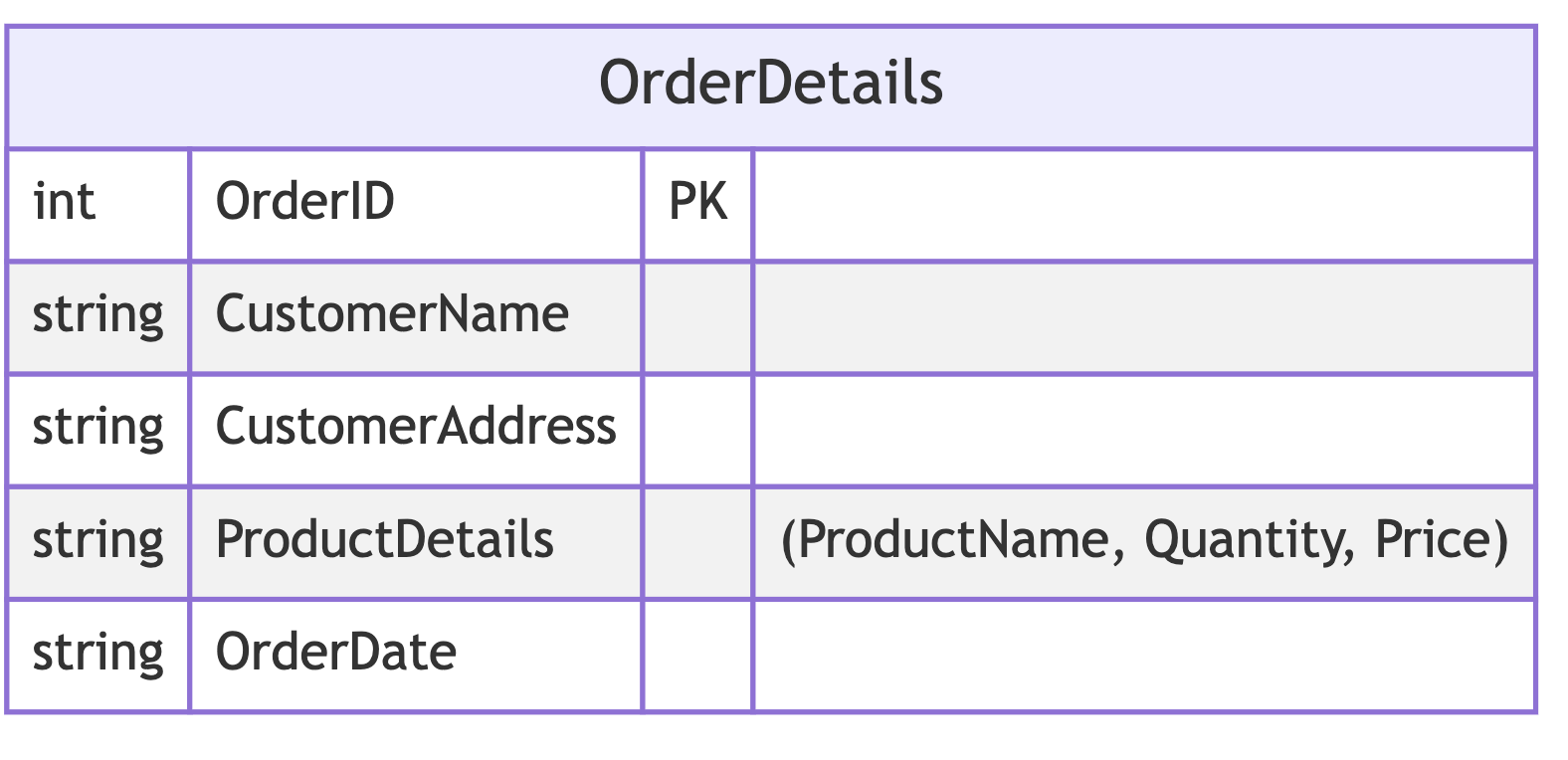
8.1 Unnormalized Database (UNF)
The following table contains redundant and non-atomic data:
Sample Data (UNF):
| OrderID | CustomerName | CustomerAddress | ProductDetails | OrderDate |
|---|---|---|---|---|
| 1 | Alice Smith | 123 Maple St, NY | Phone:1:699.99, Case:2:29.99 | 2023-12-01 |
| 2 | Bob Johnson | 456 Oak Ave, CA | Laptop:1:999.99 | 2023-12-03 |
| 3 | Alice Smith | 123 Maple St, NY | Charger:1:49.99, Cable:3:9.99 | 2023-12-05 |
8.2 First Normal Form (1NF)
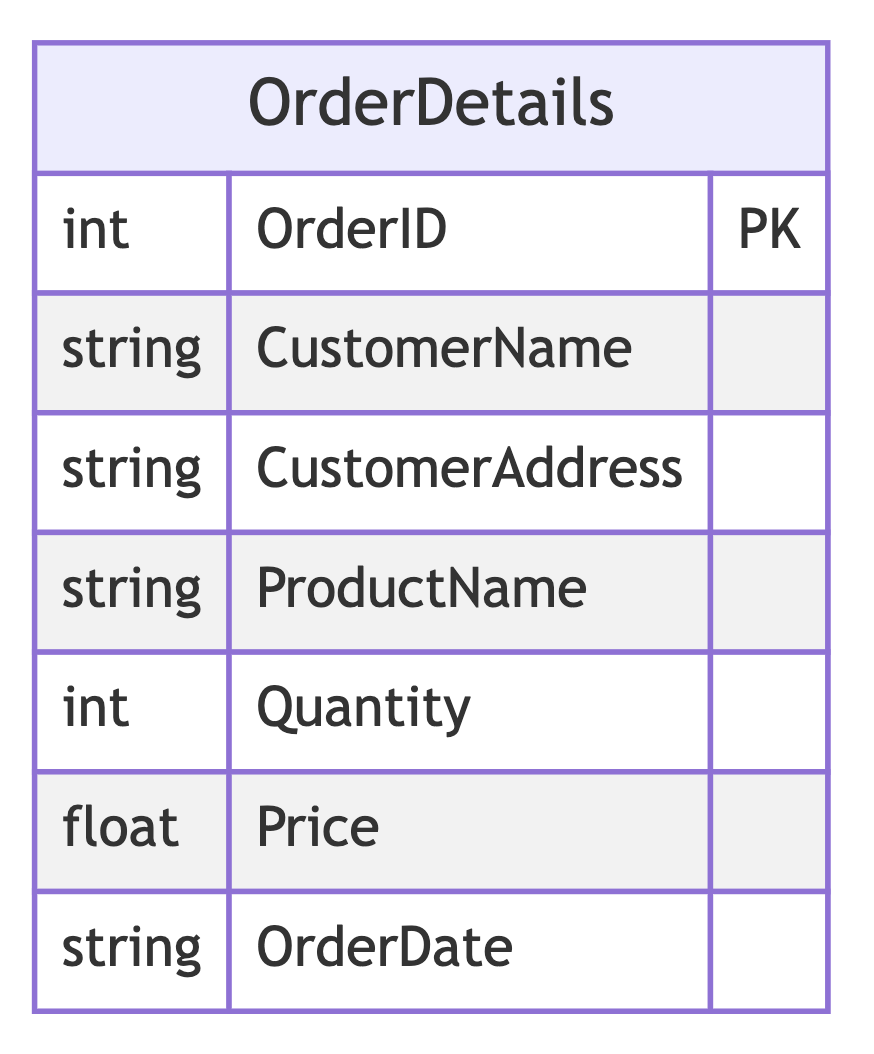
To achieve 1NF, we ensure atomicity by separating multi-valued fields into individual rows.
Sample Data (1NF):
| OrderID | CustomerName | CustomerAddress | ProductName | Quantity | Price | OrderDate |
| 1 | Alice Smith | 123 Maple St, NY | Phone | 1 | 699.99 | 2023-12-01 |
| 1 | Alice Smith | 123 Maple St, NY | Case | 2 | 29.99 | 2023-12-01 |
| 2 | Bob Johnson | 456 Oak Ave, CA | Laptop | 1 | 999.99 | 2023-12-03 |
| 3 | Alice Smith | 123 Maple St, NY | Charger | 1 | 49.99 | 2023-12-05 |
| 3 | Alice Smith | 123 Maple St, NY | Cable | 3 | 9.99 | 2023-12-05 |
8.3 Second Normal Form (2NF)
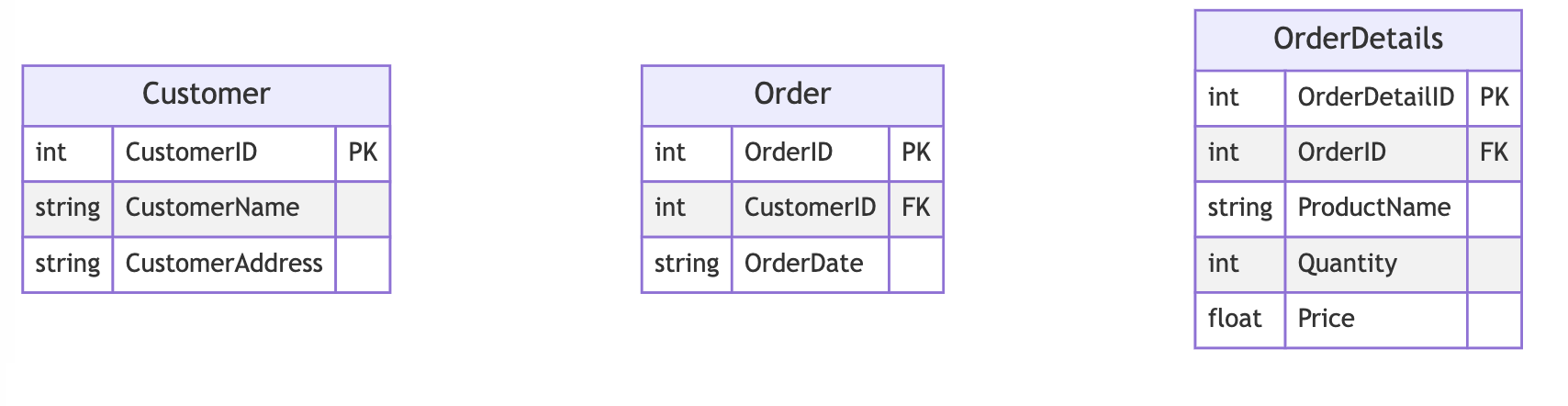
To achieve 2NF, we remove partial dependencies by creating separate tables for Customers and Orders.
Sample Data (2NF):
Customer Table
| CustomerID | CustomerName | CustomerAddress |
| 1 | Alice Smith | 123 Maple St, NY |
| 2 | Bob Johnson | 456 Oak Ave, CA |
Order Table
| OrderID | CustomerID | OrderDate |
| 1 | 1 | 2023-12-01 |
| 2 | 2 | 2023-12-03 |
| 3 | 1 | 2023-12-05 |
OrderDetails Table
| OrderDetailID | OrderID | ProductName | Quantity | Price |
| 1 | 1 | Phone | 1 | 699.99 |
| 2 | 1 | Case | 2 | 29.99 |
| 3 | 2 | Laptop | 1 | 999.99 |
| 4 | 3 | Charger | 1 | 49.99 |
| 5 | 3 | Cable | 3 | 9.99 |
8.4 Third Normal Form (3NF)
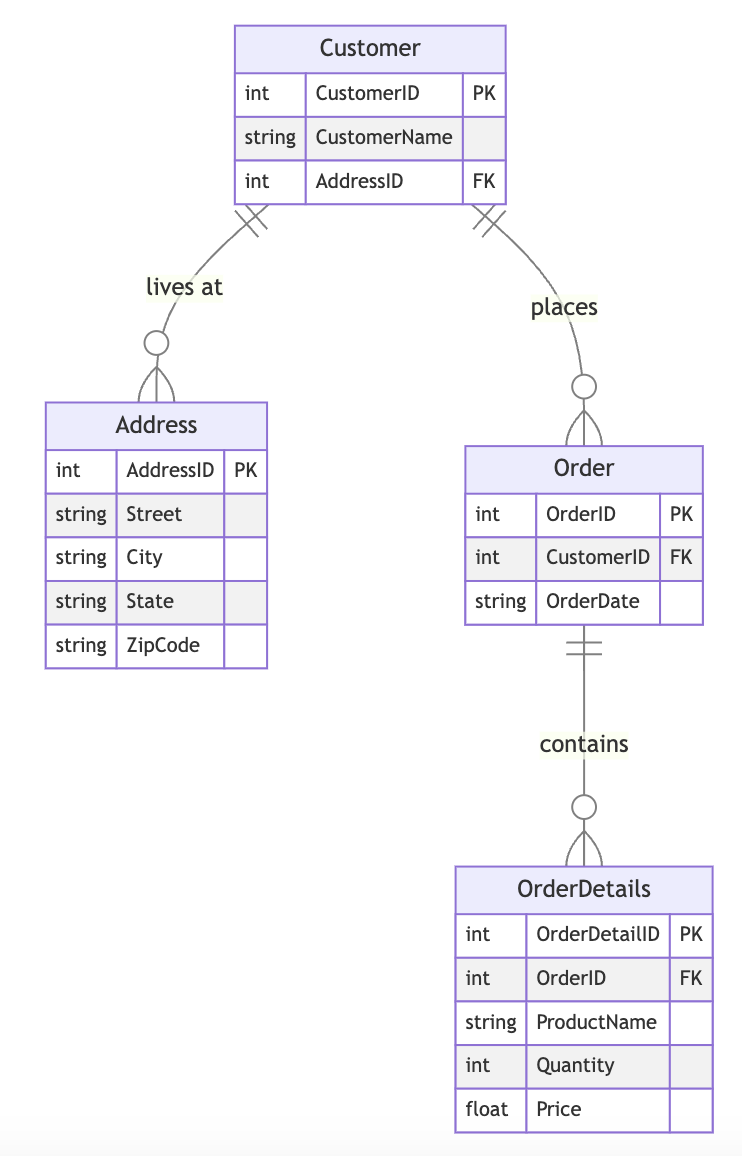
To achieve 3NF, we remove transitive dependencies by creating a separate table for addresses.
Sample Data (3NF):
Address Table
| AddressID | Street | City | State | ZipCode |
| 1 | 123 Maple St | NY | NY | 10001 |
| 2 | 456 Oak Ave | CA | CA | 90210 |
Customer Table
| CustomerID | CustomerName | AddressID |
| 1 | Alice Smith | 1 |
| 2 | Bob Johnson | 2 |
Order Table
| OrderID | CustomerID | OrderDate |
| 1 | 1 | 2023-12-01 |
| 2 | 2 | 2023-12-03 |
| 3 | 1 | 2023-12-05 |
OrderDetails Table
| OrderDetailID | OrderID | ProductName | Quantity | Price |
| 1 | 1 | Phone | 1 | 699.99 |
| 2 | 1 | Case | 2 | 29.99 |
| 3 | 2 | Laptop | 1 | 999.99 |
| 4 | 3 | Charger | 1 | 49.99 |
| 5 | 3 | Cable | 3 | 9.99 |
Summary of Normalization Process:
- UNF: Data redundancy and multi-valued attributes.
- 1NF: Atomic values ensured, multi-valued attributes removed.
- 2NF: Partial dependencies removed, separate tables created.
- 3NF: Transitive dependencies removed by introducing a separate Address table.
This exercise demonstrates how to normalize an unstructured database while ensuring data integrity and reducing redundancy.
Sample problem
Normalize the following unnormalized data to Third Normal Form:
Full Library Management System Sample Data
Unnormalized Data (UNF):
| TransactionID | BorrowerName | BorrowerAddress | BorrowedBooks | TransactionDate |
|---|---|---|---|---|
| 1 | Sarah Johnson | 123 Elm St, NY | Book1:Author1, Book2:Author2 | 2023-12-01 |
| 2 | Mark Spencer | 456 Pine Rd, CA | Book3:Author1 | 2023-12-02 |
| 3 | Sarah Johnson | 123 Elm St, NY | Book4:Author3, Book5:Author2 | 2023-12-03 |
- Convert to 1NF
- Convert to 2NF
- Convert to 3NF
- Make Mermaid ER diagram of solution