
Goal
For this classes we will use GIT to track our projects on the GitHub server. Basic GitHub is free for public. GitHub is a code hosting platform for version control and collaboration. It lets you and others work together on projects from anywhere.
Note: I only expect you to work on this assignment for a couple of hours. The idea is to learn to use github by using it.
Overview
Git is typically used for a group to synchronize their activities. to do this there is a common repository server that everyone pushes to and pulls from, and sometimes merges with. We will be using GitHub as our repository. GitHub is an online repository that alows groups of people to work on a project together, allowing them to work on and synchronize their work. It also keeps a complete history of ALL versions of every file in the project. In this class all groups are required to create an use a repository for group projects. You will sent your project name to the instructor so the project can be monitored.
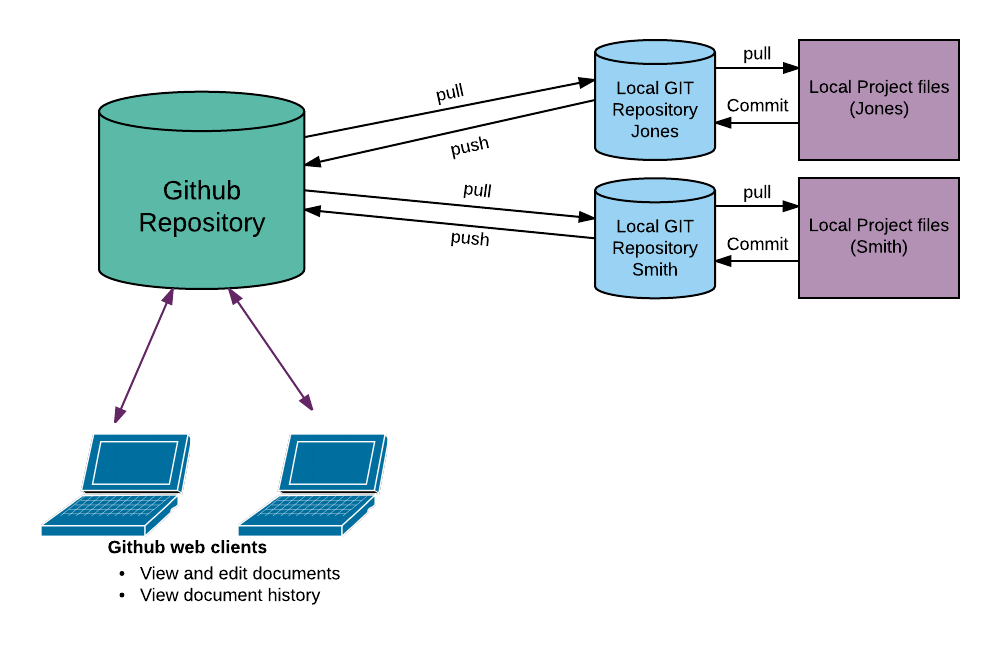
You will manage the code state with “commit”, “push”, “pull”, “clone”, and “fetch” operation.
The process works as follows.
- A project is created on Github.
- Init a git repository in a project (git init)
- Add the files to the local repository (git add .)
- Commit the files to the new repository (git commit)
- Other gets the code into their private repository and code base (git clone)
- Team members work on code and test locally. (use textwrangler and notepad++, make, and test)
- Individuals commit work (git commit)
- Individuals pull to get any changes in main repository (git pull)
- Individuals may have to merge changes in main repository with local changes.
- Indiviiduals do a push to update master (git push)
Method
You will work with your team (Assigned by the instructor) to create a GIT repository that is a clone of this webchat starter program: https://github.com/jimskon/WebChatStart. You will then work together, pushing and pulling, adding some simple features to the code.
My Web chat program: http://jimskon.com/class/softdev/skon/selfchat/selfChat.html
Steps
- The team members will each create a GitHub account.
- One team member make a clone of the WebChatStart program. They will then remove the git information from my project with:
rm -rf .git
in the project directory. This removes the .git directory and it’s contents. Note – the “.git” directory is hidden (because it begins with a ‘.’), you have to do a “ls -a” to actually see it! - That member go into “Settings->Manage Access”. There they will add the other users.
- Each user will run “.ssh-keygen” from there command line in the main directory on jimskon.com. Then they will do a “cat .ssh/id_rsa.pub:”. Copy the output. Go in to the menu on the upper right of yout github screen, and select settings. Go into “SSH and GPG Keys”. CLick on “New SSH key”, and put in you public get from above.
- Modify the program for YOUR project (IMPORTANT!):
a. Change the line 60 in webchat.js to be your team name rather than “skon”:
url: “/cgi-bin/skon_webchat.py?message=” + message + “&id=”+id,
b. In chatServer.py, webchat.py, and testchat.py change:
fifoname=”skonChat”# Unique name for fifos
to be a unique name for you.
c. In make change user to your team name. - Change to name of the project directory to the project name YOUR team decides to use.
- The team member who cloned the project will then create a NEW project (with the new name from step 3) in github, and store this code in that project. Do this by clicking on the new project button in github. Enter the name and hit the “Create repository” button. Then paste the code that is shown into the terminal while in the new project directory (with the code you cloned from my project). This will not work if you didn’t delete the hidden “.git’ directory!
- Add Collaborators: The team member who created the guthub project must click on the “Settings” tab, and then the “Manage Access” option. Then click the green “Invite a Collaborator” button at the bottom, and enter the user’s github username.
- The other team members will then git clone this new project into their main user directory.
- The teams members will then work together to add several new features to the code. Divide up the work, and each team member will share their work by pulling and pushing regularly from he repository.
- After you clone the project the work flow will be:
– Do a git pull to get the latest version.
– Work on the code, testing it well.
– Do a git commit filename whenever you have a version of the code you want to keep (filename is the file you are committing)
– When you wish to push your work to the github repository, do a git commit filename, then do a git pull. If there are no merge conflicts, you can now do a git push to push your changes to git hub (so others can pull it).
– Conflicts: If you get a merge conflict from the git pull, you will have to edit all the files with a conflict. The files will contain something like:
<<<<<<<<<<<<<<<<<<<<<< Head
conflicting code from the repository
More conflicting code
======================
Conflicting code from the local file
More conflicting stuff
>>>>>>>>>>>>>>>>>>>>>>
You will need to pick the code you want, deleting the code you don’t want, and removing the “<<<<“, “=====”, and “>>>>>” lines.
After you fix and test the conflicts, you will need to start the process again, r.g. commit, pull, (maybe fix). Then you can git push when you get no errors. - Features to add (I don’t mean for this to take a lot of time, it’s to give experience with github> If you get stuck, PLEASE come see me).
– Automatically poll the server once a second for new messages. (You can use setTimeout: documentation.)
Note: (Important) you will need to use setTimeout to periodically call the $ajax function to call the server. However, you must ONLY call setTimeout from the processResults function. This way you only setup a new call if the last call was successful. If you always call the server whether it responds or not, you will bring down the server if program doesn’t! For the same reason don’t use setInterval(). The function processResults() is a “callback” function, and only gets called when the $ajax call is successful. This means the process will only start if you send a message. This is what I want.
– Have each user enter in their name, and put their names in front of their messages.
– Make the pages look nicer.
– (Optional) add two more features you think up. Some possibilities: Show a list of other users. Have a button to leave the chat. Send only a single other member (private). Send a picture. - I will expect to see several pushes to the git project for each team member.
| Team | Members |
| 1 | Akre, Dev Brylka, Sebastian Khakurel, Asmod |
| 2 | Muther, Lucas Winston-Khan, Alana Yarber, Ulysses Cohen, Jack |
Turn in
A. 2-3 paragraph lab report answering:
- A link to the git hub project, and to the working system.
- What are the purposes of Git?
- What is github versus git?
- What problems did you experience in this lab?
- How you resolved the problems given above?
- How could this lab be better?
B. A link to the github project
C. A link you your working chat page
References
Review the following as needed. Remember you can ignore things relating to INSTALLING and REMOTES.