
Part 1 – Radix Sort
Note– you must complete this assignment on Linux. See here for how to setup and use Linux: Linux at Kenyon
Radix sort algorithm is a non-comparative sorting algorithm in computer science. It avoids comparison by creating and categorizing elements based on their radix. For elements with more than one significant digit, it repeats the bucketing process for each digit while preserving the previous step’s ordering until all digits have been considered.
Using queue to implement radix sort:
In radix sort algorithm, a list of integer numbers will be sorted based on the digits of individual numbers. Sorting is performed from least significant digit to the most significant digit.
Radix sort algorithm requires the number of passes which are equal to the number of digits present in the largest number among the list of numbers. For example, if the largest number is a 3 digit number then that list is sorted with 3 passes.
Step by Step Process
The Radix sort algorithm is performed using the following steps…
- Step 1 – Define 10 queues each representing a bucket for each digit from 0 to 9.
- Step 2 – Consider the least significant digit of each number in the list which is to be sorted.
- Step 3 – Insert each number into their respective queue based on the least significant digit.
- Step 4 – Group all the numbers from queue 0 to queue 9 in the order they have inserted into their respective queues.
- Step 5 – Repeat from step 3 based on the next least significant digit.
- Step 6 – Repeat from step 2 until all the numbers are grouped based on the most significant digit.
Example:
Consider the following list of unsorted numbers: 82, 901, 100, 12, 150, 77, 55, 23
Step 1: Define 10 queues where each represents a bucket for digits 0 to 9;

Step 2: Insert all the numbers of the list into respective queue based on the least significant digit of every number:
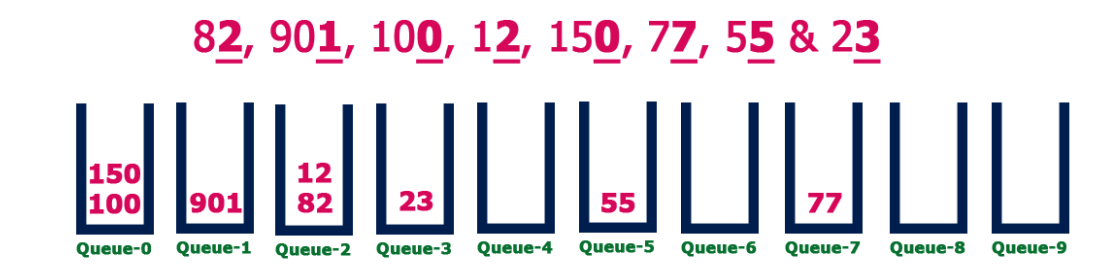
Group all the numbers from Queue-0 to Queue-9 in the order were inserted, creating a new list:
100, 150, 901, 82, 12, 23, 55, 77
Step 3: Insert all the numbers of the list into respective queue based on the next least significant digit (tens column) of every number:
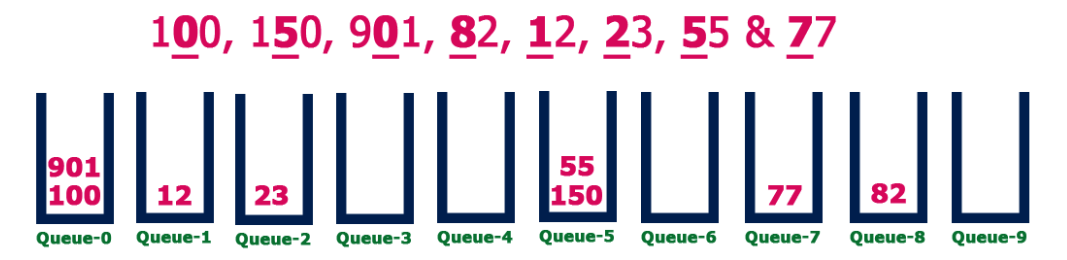
Group all the numbers from Queue-0 to Queue-9 in the order were inserted, creating a new list:
100, 901, 12, 23, 150, 55, 77, 82
Step 4: Insert all the numbers of the list into respective queue based on the next least significant digit (hundreds column) of every number:
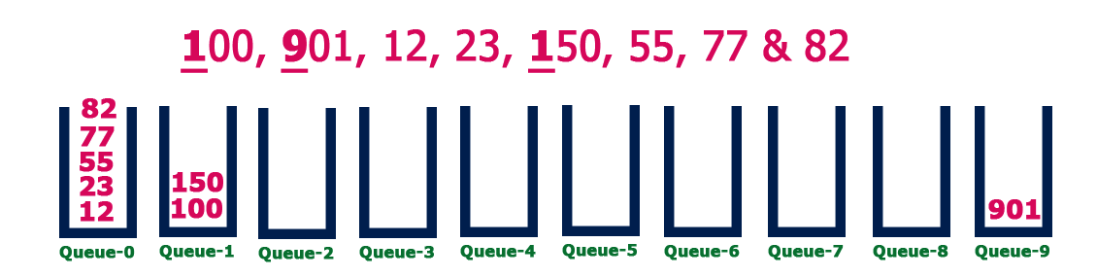
Group all the numbers from Queue-0 to Queue-9 in the order were inserted, creating a new list:
12, 23, 55, 82, 100, 150, 901
The list is now sorted!
Implement this algorithm (using queues) and test the Radix Sort Algorithm. The test function should have the following interface: Ask for d (number of digits) from the user. Ask for the quantity of n numbers to generate. Generate (and store in a container (e.g. array, vector)) the set of n random integers with at most d digits to be sorted. Print the array before it is sorted. Sort the array with the Radix Sort algorithm. Finally, print the sorted array. Format your output so that it looks neat and easy to read.
Run the program with the following inputs
| Digits | Numbers |
| 2 | 100 |
| 5 | 100 |
| 10 | 100 |
| 5 | 1000 |
| 10 | 10000 |
Turn in the runs in a file “runs.txt” in the github project.
Part 2: Simulation (Chapter 8 )
For this assignment read about simulation using priority queues start on page 472 in the text. We will be customers at a movie theater waiting in line for tickets. The authors start code is in the Github repository.
- Write the definitions of the functions
setWaitingTime,getArrivalTime,getTransactionTime, andgetCustomerNumberof the classcustomerTypedefined in the section, ‘‘Application of Queues: Simulation.’’ - Write the definitions of the functions
getRemainingTransactionTime,setCurrentCustomer,getCurrentCustomerNumber,getCurrentCustomerArrivalTime,getCurrentCustomerWaitingTime, andgetCurrentCustomerTransactionTimeof the classserverTypedefined in the section, ‘‘Application of Queues: Simulation.’’ - Write the definition of the function
runSimulationto complete the design of the computer simulation program (see the section, ‘‘Application of Queues: Simulation’’). Test run your program for a variety of data. - Use AI (CHatGPT) to write a program to generate random simulation data and run the program 500 times, reporting the results.
Note: Sheet showing computation of arrivals
Run a simulation and turn in results.
Here is another program demonstating a simulation: https://github.com/Kenyon-CS/PeirceLines
Lab 8 – Part 1: Radix Sort (50 points total)
| Category | Points |
|---|---|
| Correctness of Radix Sort & Queue Usage | 20 |
| Input Handling, Random Data Generation, Output & runs.txt | 15 |
| Code Style, Structure, and Commenting | 10 |
| Build Success & Repository Organization | 5 |
Lab 8 – Part 2: Simulation (50 points total)
| Category | Points |
|---|---|
| Correctness of customerType, serverType, and runSimulation Implementation | 25 |
| Random Data Generation, 500-run Experiment, and Report Output | 15 |
| Code Style, Structure, and Commenting | 5 |
| Build Success & Repository Organization | 5 |
Partners
Lab5-Pair-01: Trang Nguyen, Luke Galik
Lab5-Pair-02: Leo Xie, Nora Archer
Lab5-Pair-03: Joey (Jiayin) Liu, Cloris (Zongyu) Liu
Lab5-Pair-04: Calvin Deka, Peter Dunson
Lab5-Pair-05: Khanh Mai, Sariyah Sintayehu
Lab5-Pair-06: Ella Rigoli, Djordje Dragojlovic
Lab5-Pair-07: Eden Cohen, Shadia Amado-Aguad
Lab5-Pair-08: Lucas Waite, Hoan Nguyen
Lab5-Pair-09: Davelle Ampofotwumasi, Westley (Kelly) Kailus
Lab5-Pair-10: Yaw Oppongkrampah, Moe Belghith
Lab5-Solo-11: Adam Khan
Lab5-Solo-12: Kuba Kopczuk