
Background
This assignment is a review from the first programming course
This program with be done with pair programming. You will be assigned a partner.
First review the following Point class used to store information for points on a plane:
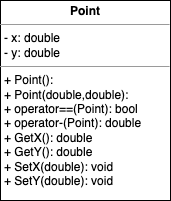
Here is code for the Point class, along with a test driver: PointClass
Review this code, this is a model for both the design, coding and testing a class. This code used operator overloading, something you learn in introduced in programming, but it also overloads the built in binary operators == and – (which may be new to you. Play with this code, and make certain you understand it.
How to join your assigned team
- Click the assignment link → Accept this assignment.
- On the “Teams” step:
- If you’re the first from your pair: choose Create a new team and type the team name exactly as shown below (e.g.,
Pair-01). - If you’re the second from your pair: choose your team from the list (do not create a new one).
- If you’re the first from your pair: choose Create a new team and type the team name exactly as shown below (e.g.,
- Max team size is 2. Do not join the wrong team or create extra teams.
- After you accept, you should see a repo named like
orgname-assignmentname-TEAMNAME. Both teammates will have access. - Made a mistake? Stop and email the instructor; do not push code to the wrong repo.
Exact team names and members
- Pair-01 — kopczuk1@kenyon.edu, waite1@kenyon.edu
- Pair-02 — oppongkrampah1@kenyon.edu, ampofotwumasi1@kenyon.edu
- Pair-03 — kailus1@kenyon.edu, vasconez1@kenyon.edu
- Pair-04 — belghith1@kenyon.edu, nadeem2@kenyon.edu
- Pair-05 — deka1@kenyon.edu, dragojlovic1@kenyon.edu
- Pair-06 — mai1@kenyon.edu, dunson1@kenyon.edu
- Pair-07 — khan1@kenyon.edu, xie4@kenyon.edu
- Pair-08 — rigoli1@kenyon.edu, aslam1@kenyon.edu
- Pair-09 — liu17@kenyon.edu, makelele1@kenyon.edu
- Pair-10 — ellis3@kenyon.edu, nguyen7@kenyon.edu
- Pair-11 — amadoaguad1@kenyon.edu, kwon2@kenyon.edu
- Pair-12 — sintayehu1@kenyon.edu, lee14@kenyon.edu
- Pair-13 — archer1@kenyon.edu, nguyen15@kenyon.edu
Notes
- Use the exact capitalization and hyphen in the team name (e.g.,
Pair-07). - All commits should go to your team repo. Don’t use personal repos for this assignment.
- Communicate with your partner—only one of you needs to create the team; the other joins it.
- You only need to do this for the first of the 3 projects for this assignment, all three share the same team, so yo just select the right team after the first.
Problem 1: Roman Numerals.
(Based on textbox chapter 1 programming problem 1) Here is the starter code for this project: roman numerals. Here are algorithms for conversion: link. The class will internally store the number in string. You must design the class for roman numerals so that it follows this design:
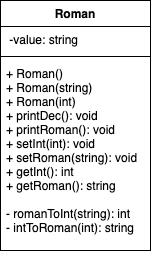
You should also write private helper functions to convert from a int to a roman numeral, and from a string roman numeral to a int. (seen at bottom of class diagram)
You will need to create a Makefile for this project. Start with the Makefile from the Point project above, create a makefile for this project.
Explanation:
- Private Members:
romanNumeral: Stores the Roman numeral as astd::string.integerValue: Stores the corresponding integer value.romanToInt: A utility function to convert a Roman numeral string to an integer.intToRoman: A utility function to convert an integer to a Roman numeral string.
- Public Methods:
- Constructors:
Roman(): Default constructor.Roman(const std::string&): Constructor that initializes the object with a Roman numeral string.Roman(int): Constructor that initializes the object with an integer.
- printDec(): Prints the integer value.
- printRoman(): Prints the Roman numeral.
- getInt(): Returns the integer value.
- getRoman(): Returns the Roman numeral as a string.
- Constructors:
This header file sets up the class definition. You can then implement these methods in a corresponding Roman.cpp file.
Testing: You are given a main.cpp program that has some testing. Add more tests to fully test this class.
Do not use AI for any part of this problem.
Problem 2: Line Class.
(Based on textbox chapter 1 programming problem 6)
The equation of a line in standard form is ax + by = c, where a and b both
cannot be zero, and a, b, and c are real numbers. If b != 0, then –a / b is the
slope of the line. If a = 0, then it is a horizontal line, and if b = 0, then it is a
vertical line. The slope of a vertical line is undefined. Two lines are parallel if
they have the same slope or both are vertical lines.
Two lines are perpendicular if either one of the lines is horizontal and another
is vertical, or if the product of their slopes is –1. Design the class lineType
to store a line. To store a line, you need to store the values of a (coefficient of x), b (coefficient
of y), and c.
For this your are to create a class called class Line. You will also need a second class Point, which is used to represent the x and y values of a point. For these class you will first need to design both classes using the diagrams.net program. The GibHub link for this repl project is here: line Project.
Your lineType class should permit the following operations:
- A default contructor lineType() (what should this do?)
- A constructor lineType(a,b,c)
- double slope()
- line1 == line2 – Return True if lines are equal. This returns a bool. You will need to overload the == for this. See this and this for how to do this.
- line1 || line2 – Return True if lines are parallel. Returns a bool.
- line1 | line2 – Return True if lines are perpendicular. Returns a bool.
- Point* intersect(line2) – This will be called as
Point *p = line1.intersect(line2)
and with thus return a pointer to a point where the points intersect. It should return a NULL if the lines don’t intersect. - void print() – print the line information.
- If you feel you need other methods, add them
Line class implementation notes
1. You must write all of the implementation of the Line class yourself (no AI)
2. You should use the point class I created for you above. Using a class in another class is call “containment”.
3. You will need to make a Makefile again.
4. You should write and initial test routine to test your Class. (LinetTest.cpp)
5. After you get everything running an tested, submit your Line.h code to ChatGPT 4 (OpenIA). Then ask it to create a complete C++ test program to test ALL aspects of the or your class. You may need multiple promts to get a good, complete test program. Get this code running as well, and add it as a second test program to the project.
6. Create a file “TestNotes.txt”, and in it write a essay comparing and contrasting your test program with the one written by ChatGPT. What did you learn from this exercise.
7. You can compute the intersection of two lines with:
double det = A1 * B2 - A2 * B1
if (det == 0) {
  //Lines are parallel
} else {
  double x = (B2 * C1 - B1 * C2) / det
  double y = (A1 * C2 - A2 * C1) / det
}Code language: JavaScript (javascript)
8. You can represent infinity as follows:
#include <limits>
double a = std::numeric_limits<double>::infinity();
See below for what I am expecting for this and all problems in this course.
Turn in on moodle
- A link your three GitHub projects.
- Your Class diagrams. You must use the diagrams.net program to create.
- The outputs of your test programs.
Your tests must FULLY test the the classes.
Grading
| Requirements | Grading Comments | Points | Score |
|---|---|---|---|
| Good Code Design | 40 | ||
| Tests for all functions including common and boundry cases. | 30 | ||
| Class Diagrams | 10 | ||
| Comments | 10 | ||
| Proper use of AI to create a test program | 10 | ||
| Total | 100 |
Requirements for all assignments
Good Code Design: Since this course is also about “program design”, this is an essential point you need to keep in mind. So, this requirement is understood and will not be repeated for future assignments.
Testing: Having solved a problem correctly may not be good enough to get full points. You need to write a good test program. This is something you need to think carefully about for each assignment. Make sure that your program tests all aspects of the assignment.
User Interface: All programs should have a well designed user interface. The program should, for example, allow the user to repeat it’s operation until the user is done. It should also validate the values entered for correct type and range.
Pair Programming: You will be working in pairs for the programming assignments in this course.
Comments: At the top of each program you submit in this course, you need to include the following information:
- The names of students who wrote the programs
- A description of the program
- A statement saying that each person contributed about equally to the development of theprogram and you followed the guidelines for Pair Programming.
Each function should include comments for:
- A brief description of the functions purpose
- Preconditions
- Postconditions
- Each parameter (Example below)
/**
 * Divides two numbers.
 * Precondition: num2 is not zero.
 * Postcondition: Returns the quotient of num1 and num2.
 * @param num1 the numerator
 * @param num2 the denominator
 * @return the quotient of num1 and num2
 */
double divide(double num1, double num2)
{
   return num1 / num2;
}