
Goal
To learn about functions and Turtle graphics
Method
Step 1
Project code: https://replit.com/@SCMP118Fall22/Lab-2-Part-1-Turtle-Drawing
- First consider the simple the code given. (Note it has no comments. You should add that.)
- Finish the drawPolygon and drawRectangle functions. Draw several Polygons and rectangles.
- Add code to test (and demonstrate) all your functions.
- Add a color parameter to the other draw functions.
- Add code to test (and demonstrate) everything.
Step 2
Next consider the following Project: https://replit.com/@SCMP118Fall22/Lab-2-Part-2-Draw-Neighborhood
This code demonstrates several new concepts:
- moveRelative(t,x,y,d) – This function moves relative to the current location, x pixels right, and y pixels up, and points the turtle in the d direction. This functions allows you to move relative to your current position, rather than to an absolute position. This can be very helpful when writing function to build an object (like a house or person) since we can draw the parts relative to the starting position.
- sPos=t.pos() – this saves the current x and y location in sPos. The command moveTurtle(t,sPos[0],sPos[1]) moves you back to the saved position.
- t.fillcolor(fill) – this sets the fill color of turtle t to file (fill can be “red“, “blue“, “green“, etc).
- t.begin_fill() and t.end_fill() – if a shape with turtle t in drawn in between these, it is filled with the current fill color.
- drawScalableShape(t,size) – this demonstrates how we can make a shape “scalable”. The idea is all the items drawn in the routine are drawn relative to the current turtle position, and scaled to the given size.
- Finish the drawRectangle and drawPolygon functions.
- Add line and fill colors to the other drawing functions, as is done in drawTriangle.
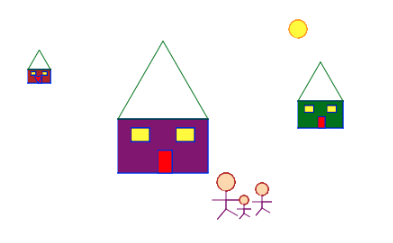
- Finish the drawScalableHouse function. The house should make use of the other functions to make a house with a roof, a door, some windows, and anything else you feel is nice. The house should use color and fill to make it look nice. The trick is the make the house scalable. In order to do that you will need to draw everything relative to the starting position of where you start the house. An example of a scalable drawing is below. Not that I use a function I wrote called moveRelative to relative to my current position, and that moves are a fraction of the size. Notice also that the size of everything is a fraction of the original size. Thus when chage the size of the object, everything in the object scales accordingly.
- Make a function drawScalablePerson to draw a stick figure of a given size, color and fill. This should be scalable too.
- Make a function buildNeighborhood(t) that displays 3 houses, and 5 people (using drawScalableHouse and drawScalablePerson). Your goal is to try to make the sizes of the elements in a range that makes sense (not to big or small), and that are actually on the screen (not in some far of location). The program should also put a sun in the sky using the built-in circle function.
Turn in
- Finish the two projects above in repl.it and submit them.
- On Moodle turn in the replit links of the two programs AND a screen shot of the outputs of the two programs.
Grading
Turn in a Repl.it link, as well as screenshots of the runs
| Requirements | Grading Comments | Points | Score |
|---|---|---|---|
| Completion of all functional requirements | 60 | ||
| Code broken up in small, single function functions | 10 | ||
| Appropriate code formatting | 5 | ||
| Meaningful identifier names (variables, functions) | 10 | ||
| Comments at the top, and on all functions | 5 | ||
| Document with screen capture of picture | 10 | ||
| Total | 100 |