
Refs:
- Github project: https://github.com/Kenyon-CS/blogclass
- https://guides.rubyonrails.org/association_basics.html#the-has-and-belongs-to-many-association
- https://stackoverflow.com/questions/5120703/creating-a-many-to-many-relationship-in-rails
- https://stackoverflow.com/questions/74593543/rails-7-many-to-many-relationship-create-action-inserts-duplicate-values-when
Step 1 – add the models
Add a topic model:
bin/rails generate model Keyword word:stringNow create the association with Articles:
rails generate migration CreateJoinTableArticleKeyWord article keywordStep 2 – Create a CRUD for keywords.
Now we need to create a complete CRUD for the keyword table. It is a lot like the articles model, but simpler.
We need a controller keywords_controller.rb
class KeywordsController < ApplicationController
  def index
    @keywords = Keyword.all
  end

  def show
    @keyword = Keyword.find(params[:id])
  end

  def new
    @keyword = Keyword.new
  end

  def create
    @keyword = Keyword.new(keyword_params)

    if @keyword.save
      redirect_to @keyword
    else
      render :new, status: :unprocessable_entity
    end
  end

  def edit
    @keyword = Keyword.find(params[:id])
  end

  def update
    @keyword = Keyword.find(params[:id])

    if @keyword.update(keyword_params)
      redirect_to @keyword
    else
      render :edit, status: :unprocessable_entity
    end
  end

  def destroy
    @keyword = Keyword.find(params[:id])
    @keyword.destroy

    redirect_to "/keywords", status: :see_other
  end

  private
    def keyword_params
      puts "keyword: #{params}"
      params.require(:keyword).permit(:word)
    end

end
Code language: JavaScript (javascript)
We need route resources added to routes.rb
resources :keywordsCode language: CSS (css)Add new views for keyword. We need to have:
- index.html.erb
- new.html.erb
- show.html.erb
- edit.html.erb
- _form.html.erb
index.html.erb
<h1>Keywords</h1>

<ul>
  <% @keywords.each do |keyword| %>

    <li>
      <a href="<%= keyword_path(keyword) %>">
        <%= keyword.word %>
      </a>
    </li>

  <% end %>
</ul>

<%= link_to "New Keyword", new_keyword_path %>Code language: HTML, XML (xml)
_form.html.erb
<%= form_with model: keyword do |form| %>
  <div>
    <%= form.label :word %><br>
    <%= form.text_field :word %>
    <% keyword.errors.full_messages_for(:title).each do |message| %>
      <div><%= message %></div>
    <% end %>
  </div>

  <div>
    <%= form.submit %>
  </div>
<% end %>Code language: HTML, XML (xml)
show.html.erb
<p>Keyword: <%= @keyword.word %></p>

<ul>
  <li><%= link_to "Edit", edit_keyword_path(@keyword) %></li>

  <li><%= link_to "Destroy", keyword_path(@keyword), data: {
                    turbo_method: :delete,
                    turbo_confirm: "Are you sure?"
                  } %></li>

</ul>
Code language: HTML, XML (xml)
new.html.erb
<h1>New Keyword</h1>

<%= render "form", keyword: @keyword %>Code language: HTML, XML (xml)
edit.html.erb
<h1>Edit Keyword</h1>

<%= render "form", keyword: @keyword %>Code language: HTML, XML (xml)
It should work now.
Now we should add a Keywords option to the menu in the application.html.erb. And also need to make sure the page get reloaded to add the events.
  <head>
    <title>Blog</title>
    <meta name="viewport" content="width=device-width,initial-scale=1">
    <%= csrf_meta_tags %>
    <%= csp_meta_tag %>

    <%= stylesheet_link_tag "application", "data-turbo-track": "reload" %>
    <meta name="turbo-visit-control" content="reload">
    <%= javascript_importmap_tags %>
    <script src="//code.jquery.com/jquery-1.11.2.min.js"></script>
</head>Code language: HTML, XML (xml)<li class="nav-item">
<a class="nav-link active" aria-current="page" href="/keywords">Keywords</a>
</li>Code language: HTML, XML (xml)Step 3 – Add keywords to articles
Set up associations in the models:
article.rb:
class Article < ApplicationRecord
  include Visible

  has_many :comments, dependent: :destroy
  has_and_belongs_to_many :keywords


  validates :title, presence: true
  validates :body, presence: true, length: { minimum: 10 }

end Code language: CSS (css)
keyword.rb
class Keyword < ApplicationRecord
	has_and_belongs_to_many :articles

endCode language: CSS (css)
This tells the database to set up a special association table articles_keywords.
We then migrate:
rails db:migrateCode language: CSS (css)You should now be able to do CRUD on keywords.
Step 4 – Add keywords to new articles
We want to add keywords by clicking on buttons:
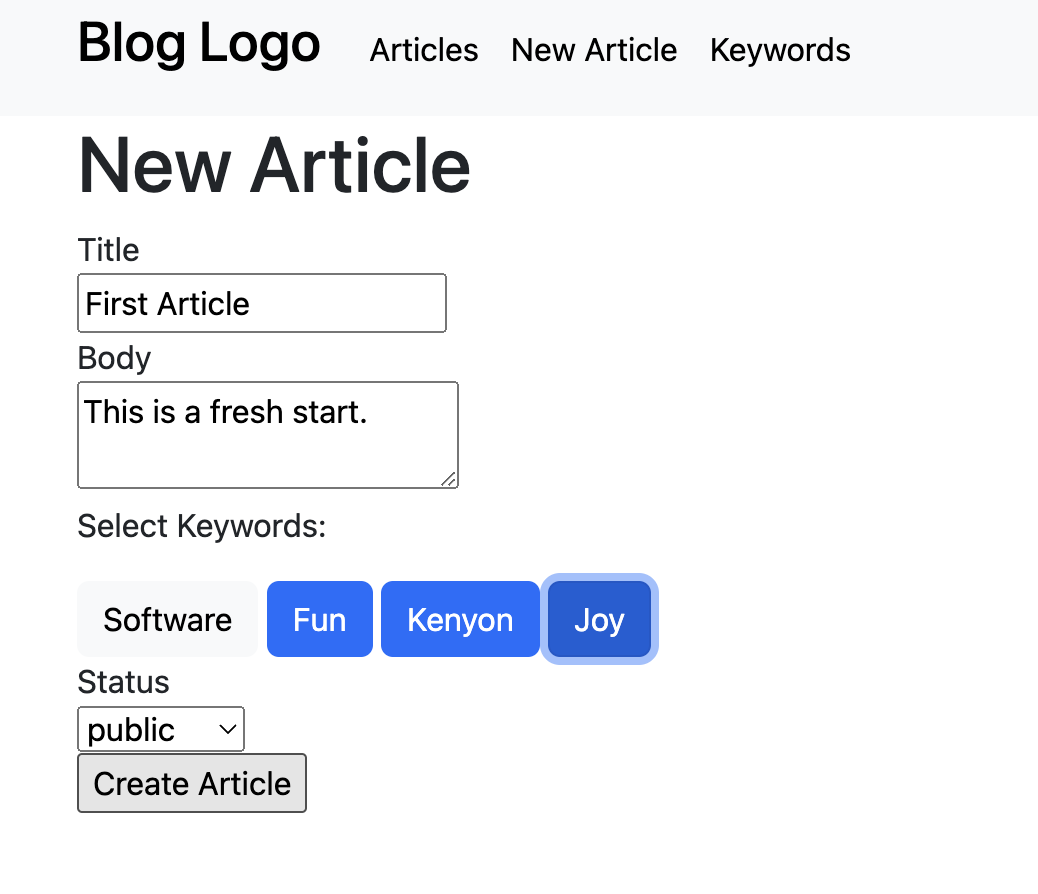
So we need to add some more code. What we want to do is add the Buttons to the screen when we view the form. If it is a new form, all the buttons start grey. If it is a edit form, we want to highlight the buttons that are in the association table. Lets start withe the add. We need to modify the _form.html.erb, add code to the articles_controller:
_form.html.erb
<%= form_with model: article do |form| %>
  <div>
    <%= form.label :title %><br>
    <%= form.text_field :title %>
    <% article.errors.full_messages_for(:title).each do |message| %>
      <div><%= message %></div>
    <% end %>
  </div>

  <div>
    <%= form.label :body %><br>
    <%= form.text_area :body %><br>
    <% article.errors.full_messages_for(:body).each do |message| %>
      <div><%= message %></div>
    <% end %>
  </div>

  	<p>Select Keywords:</p>
  	<div id="keyword_buttons">
	<% Keyword.all.pluck(:word, :id).each do |keyword, keyid| %>
	    <button type="button" class="keyword btn btn-light" value=<%= keyid =%>><%= keyword =%></button>
	<% end %>
  	</div>
  <div>
  <%= form.label :status %><br>
  <%= form.select :status, Visible::VALID_STATUSES, selected: article.status || 'public' %>
  </div>

  <input type="hidden" id="article_keywords" name="article[keywords]" value="">


  <div>
    <%= form.submit %>
  </div>
<% end %>Code language: JavaScript (javascript)
This creates a set of buttons for each topix, grey, and adds the keyword ID to the value tag of each button.
The “hidden” input form element is a trick. It allows us to add an input field to the input form that the user doesn’t see. What we will do is pass back a list of the keyword ID’s selected.
Now we need to make a way for the buttons to work, and for a list of the keyword IDs associated with the buttons pushed to be passed back to the controller.
First we need to add javascript to the application at app/javascript/application.js:
// Configure your import map in config/importmap.rb. Read more: https://github.com/rails/importmap-rails
import "@hotwired/turbo-rails"
import "controllers"
import "popper"
import "bootstrap"


function insertKeywordsIntoForm(keywords){
	var para, hiddenInput, br;
	para = document.getElementById('article_keywords');
	//console.log(keywords);
	para.setAttribute('value',keywords);
	return false; //Have this function return true if you want to post right away after adding the hidden value, otherwise leave it to false
}

$(document).ready(function() {
  $('.keyword').click( function() {
    if ($(this).hasClass("btn-light")) {
    	$(this).addClass('btn-primary').removeClass('btn-light');
    } else if ($(this).hasClass("btn-primary")) {
    	$(this).addClass('btn-light').removeClass('btn-primary');
    }
    const buttons = document.getElementById("keyword_buttons");
	var keywordList = "";
	var first = true;
    for (const child of buttons.children) {
    //console.log(child.value);
  		if (child.classList.contains("btn-primary")) {
  			if (!first) {
  				keywordList+=",";
  			}
  			first = false;
  			keywordList+=child.value;
  		}
	}
    insertKeywordsIntoForm(keywordList);
  });
});Code language: JavaScript (javascript)
This code alternates the buttons color each time they are pressed. It also creates a “value” tag in the parent element <div id=”keyword_buttons”> which will hold the list of keyword IDs for the currently selected, e.g.:
<input type="hidden" id="article_keywords" name="article[keywords]" value="20,21,22">Code language: HTML, XML (xml)The value ID list is is then passed back from the form when the submit is pushed. These values are collected in the articles controller. Since there are 4 types of values being sent back, these have to be divied into two subsets, the values for the articles, and the values for the keyword association. THis is done in the articles_controller.rb below:
class ArticlesController < ApplicationController

http_basic_authenticate_with name: "jps", password: "kenyon", except: [:index, :show]

  def index
    @articles = Article.all
  end

  def show
    @article = Article.find(params[:id])
  end

  def new
    @article = Article.new
  end

  def create
    # Separate the article from the keyword paramaters
  	@article_args=article_params.slice(:title, :body, :status)
  	@keywords_args=article_params.slice(:keywords)

	# Create a new article
    @article = Article.new(@article_args)

    # Get the IDs for the keywords
    keyword_ids = string_to_array(@keywords_args[:keywords])
    # Add an association between the article and each keyword
	keyword_ids.each { |id|
		@keyword = Keyword.find(id)
		@article.keywords << @keyword
	}

    if @article.save
      redirect_to @article
    else
      render :new, status: :unprocessable_entity
    end


  end

  def edit
    @article = Article.find(params[:id])
  end

  def update
    @article = Article.find(params[:id])
  	@article_args=article_params.slice(:title, :body, :status)
    @keywords_args=article_params.slice(:keywords)

    # Get the IDs for the keywords
    keyword_ids = string_to_array(@keywords_args[:keywords])
    # Clear the current keyword associations
    @article.keywords.clear

    # Add in the new keyword associations
	keyword_ids.each { |id|
		@keyword = Keyword.find(id)
		@article.keywords << @keyword
	}

    if @article.update(@article_args)
      redirect_to @article
    else
      render :edit, status: :unprocessable_entity
    end
  end

  def destroy
    @article = Article.find(params[:id])
    @article.destroy

    redirect_to root_path, status: :see_other
  end

  private
    def article_params
      puts "article: #{params}"
      params.require(:article).permit(:title, :body, :status, :keywords)
    end

    def string_to_array(string)
  		string.scan(/\d+/).map(&:to_i)
	end

end
Note that <span style="background-color: initial; font-family: inherit; font-size: inherit; color: initial;">article_params</span> now includes <span style="background-color: rgba(0, 0, 0, 0.2); font-family: inherit; font-size: inherit; color: initial;">:keywords</span>. This would cause <span style="background-color: initial; font-family: inherit; font-size: inherit; color: initial;"><code>Article.new(@article_args)</code> </span>to fail, since there is an extra keyword. So we fix this by slicing the extra elements with two lines of code:
Code language: HTML, XML (xml) @article_args=article_params.slice(:title, :body, :status)
@keywords_args=article_params.slice(:keywords)We then use the @article_args to create teh new article, and @keywords_args to add the keywords.
The keyword adding is simple:
    # Add in the new keyword associations
	keyword_ids.each { |id|
		@keyword = Keyword.find(id)
		@article.keywords << @keyword
	}Code language: PHP (php)
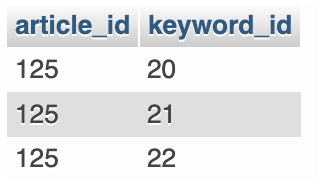
This just iterates over the keyword IDs, and then the @keyword = Keyword.find(id) adds the association the the articles_keywords association table, seen below:
Step 5 – Editting keywords for articles
Next we want to edit an article, and change the keywords. What we need to do is when we edit a article, start by highlighting the current keywords, then allow them to be clicked on to change them. When the submission is made, it works like the add, only it deletes the current keyword associations first.
The article form thus needs to be changed so that it works differently if it is an add vs an edit.
Here is the new article form:
<%= form_with model: article do |form| %>
  <div>
    <%= form.label :title %><br>
    <%= form.text_field :title %>
    <% article.errors.full_messages_for(:title).each do |message| %>
      <div><%= message %></div>
    <% end %>
  </div>

  <div>
    <%= form.label :body %><br>
    <%= form.text_area :body %><br>
    <% article.errors.full_messages_for(:body).each do |message| %>
      <div><%= message %></div>
    <% end %>
  </div>

  	<p>Select Keywords:</p>
  	<div id="keyword_buttons"">
	<% Keyword.all.pluck(:word, :id).each do |keyword, keyid| %>
	  <% if action=="edit" && Article.find(article.id).keywords.find_by(id: keyid) %>
	    <button type="button" class="keyword btn btn-primary" value=<%= keyid =%>><%= keyword =%></button>
	  <% else %>
	    <button type="button" class="keyword btn btn-light" value=<%= keyid =%>><%= keyword =%></button>
	  <% end %>
	<% end %>
  	</div>
  <div>
  <%= form.label :status %><br>
  <%= form.select :status, Visible::VALID_STATUSES, selected: article.status || 'public' %>
  </div>

  <input type="hidden" id="article_keywords" name="article[keywords]" value="">


  <div>
    <%= form.submit %>
  </div>
<% end %>Code language: PHP (php)
Notice how it uses the “action” variable, which will be “edit” or “new”, to decide how to create the keyword buttons. We need to pass this variable from articles views for new and edit:
new.html.erb
<h1>New Article</h1>

<%= render "form", article: @article, :action => "new" %>Code language: PHP (php)
edit.html.erb
<h1>Edit Article</h1>

<%= render "form", article: @article, :action => "edit" %>

Code language: HTML, XML (xml)