
SQL Based Phone Directory
Goal
To examine and set up an SQL based C++, Python, or Node based Web phone directory using MySQL.
You will use from the following projects:
- https://github.com/jimskon/PhoneBookComplete (C++)
- https://github.com/jimskon/PhoneBookPython (Python)
- https://github.com/jimskon/PhoneNodeREST (JavaScript with node.js)
The projects can be tried here:
- https://cslab.kenyon.edu/class/softdev/skon/PhoneAppComplete/phoneApp.html (C++)
- https://cslab.kenyon.edu/class/softdev/skon/PhoneAppPython/phoneApp.html (Python)
- http://cslab.kenyon.edu:9020/ (JavaScript with node.js)
Method
Step 1 – Get the demo software running from your account and with your Database:
- Download your choice of the github projects (links above)
This should be done with the followings:
Mac open a terminal or Windows open Powershell
type: “ssh username@cslab.kenyon”
Enter your student ID as the password
2. Use git to get the PhoneBookComplete, PhoneBookPython, or PhoneNodeRest projects.
Get it running. For the first two you will need :
- Create your own version of the database.
- Create the Folder PhoneBookComplete in /var/www/html/class/ssd/yourusername/
- Change the names (skon) in the software
- in Makefile change user to your username
- in the Javascript (phoneApp.js) change the, and cgi program name to your username:
$.ajax({ url: '/cgi-bin/<i><b>skon</b></i>phoneAppComplete.cgi?deleteid='+$(this).attr('ID')+'&operation=delete',
- In PhoneBook.h or phoneApp.py to change USER and DB to your _username and PASS to your student ID
#define HOST "localhost" #define USER "<i>skon</i>" #define DB "<i>PhoneAppDB</i>" #define PASS "<i>password</i>"
- In phoneApp.cpp change logfile name you your usernam
Add a PhoneBookComplete or PhoneBookPython directory to your web directory
mkdir /var/www/html/class/ssd/username/PhoneAppComplete mkdir /var/www/html/class/ssd/username/PhoneAppPython
- Type “make” to build and deploy your application
- Add the Routines to the Database (see next step)
- Go to the app in a browser (with your username):
https://cslab.kenyon.edu/class/ssd/username/PhoneAppComplete/
Add some records to the data base.
Below is the structure of the database table you will need. You need to create a table named “Phonebook” with the same fields and types, in you database:
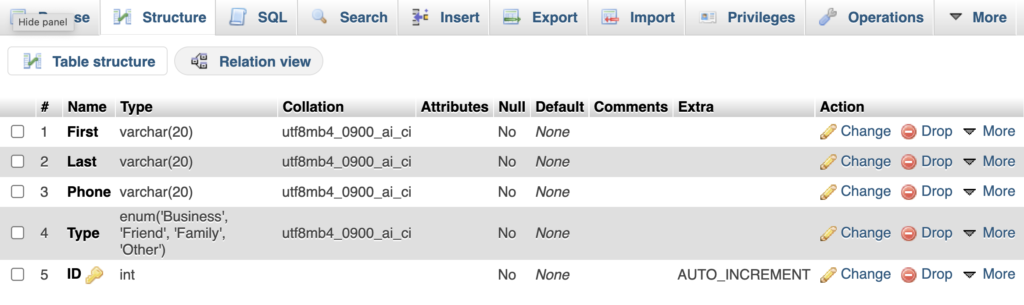
Note the “AUTO_INCREMENT” for the ID field. This field is used as the unique ID for every row, and can be used for unambiguously refering to a record when changing or deleting. The “AUTO_INCREMENT” attribute assigns unique inter values for each record in a sequence. To do this click the “A_I” box for the field (you must scroll to the right to see it). This check box is avalable both then creating the table, and when editing the structure.
- Step 3 – Get the system to work with your database.
Turn in a link to you running application.@